
If you have ever asked ChatGPT a question and wondered whether the answer was based on current information, ChatGPT Search can make a big difference.
Instead of relying only on the information built into the model, ChatGPT can search the web for current information and provide links to relevant sources. This is particularly useful for news, recent developments, product information, research, changing software features, and other topics where older information may not be enough.
In this beginner’s guide, you’ll learn how to use ChatGPT Search, when to use it, how to check its sources, and how to get more useful results from your searches.
If you’re new to ChatGPT itself, you can also read our ChatGPT Review 2026 for a broader look at its features, pricing, pros, and limitations.
What Is ChatGPT Search?
ChatGPT Search is a web-search feature that allows ChatGPT to find information from the internet and use relevant web sources when answering your question.
ChatGPT can sometimes decide automatically that a question would benefit from current web information. You can also manually select Search when the feature is available. OpenAI says ChatGPT Search can provide current information together with relevant source links.
This makes it different from asking a normal question that does not involve web search.
For example, asking:
“What is photosynthesis?”
does not necessarily require current information.
But asking:
“What are the latest developments in AI image generators in 2026?”
is much more dependent on recent information.
That is where web search becomes useful.
How to Use ChatGPT Search
Using ChatGPT Search is fairly simple.

Step 1: Open ChatGPT
Go to ChatGPT and start a conversation.
ChatGPT Search is available on the web and through supported desktop and mobile experiences. OpenAI’s current documentation also lists Search availability across Free, Go, Plus, Pro, Business, Enterprise, and Edu, although usage limits can vary by plan.
Step 2: Select Search
When Search is available, open the tools menu and select Search.
OpenAI’s current Help Center instructions say you can open a conversation, select View all tools, choose Search, and then enter your question. In supported experiences, you can also use the / shortcut and select Search.
Step 3: Ask a Specific Question
Type what you actually want to know.
For example:
- “What are the latest ChatGPT features in 2026?”
- “Find recent research about AI in small businesses.”
- “What are the current features of Leonardo AI?”
- “What are the latest cybersecurity threats affecting small businesses?”
The more specific your question is, the easier it is to get an answer that matches your purpose.
Step 4: Check the Sources
When ChatGPT uses Search, look at the sources attached to the answer.
OpenAI explains that Search can provide links to relevant sources, allowing users to go directly to the original information.
Don’t treat the answer itself as the final authority simply because it includes citations. Open the important sources and check what they actually say.
When Should You Use ChatGPT Search?
ChatGPT Search is most useful when information can change over time.
Current News and Events
News changes quickly, so a response based only on older training information may not answer a current question accurately.
You can ask ChatGPT Search to find recent reporting and provide the sources.
Technology and Software
Software products frequently change their features, pricing, availability, and user interface.
For example, if you’re researching an AI tool for an article, Search can help you check its current website and documentation instead of relying on older information.
Research
ChatGPT Search can be useful for finding several sources around a topic and getting an initial understanding of what they discuss.
OpenAI describes Search as useful for bringing together current web information and sources inside a conversation.
For important research, however, you should still open and review the original sources.
Product and Service Information
Prices, plans, specifications, availability, and features can change.
Search is therefore more appropriate for questions such as:
“What are the current plans for this software?”
rather than assuming an older answer is still accurate.
How to Write Better ChatGPT Search Queries
You don’t need complicated search commands to get useful results.
A simple but specific question usually works well.
Mention the Time Period
Instead of:
“What are the latest AI trends?”
try:
“What are the major AI trends for small businesses in 2026?”
This gives the search a clearer time frame.
Explain What You Need
Instead of:
“Tell me about ChatGPT Search.”
try:
“Explain how ChatGPT Search works for a beginner and include its current availability and main uses.”
The second question gives ChatGPT a clearer purpose and expected level of detail.
Ask for Sources
If you’re researching a topic, you can explicitly ask:
“Find reliable sources and explain the main points from each one.”
This makes source checking part of the task rather than something you remember afterward.
Ask Follow-Up Questions
One useful part of ChatGPT Search is that you can continue the conversation.
For example:
First question:
“What are the current AI tools for small businesses?”
Follow-up:
“Which of these offer a free plan?”
Another follow-up:
“Show me the official pricing pages for the tools you mentioned.”
Because the conversation retains context, you don’t necessarily have to repeat the entire question each time.
How to Check ChatGPT Search Sources
This is one of the most important habits to develop.
A citation does not automatically mean that every statement in an answer is correct.
OpenAI itself notes that ChatGPT can make mistakes, misunderstand information, oversimplify complex subjects, or fail to access a relevant webpage. Its guidance recommends checking important information and visiting sources directly when accuracy matters.
When checking a source, look at:
- Who published it?
- When was it published or updated?
- Is it an official source?
- Does the source actually support the statement?
- Is the information still current?
For software reviews, for example, an official product page or documentation may be more useful for confirming a feature than an old third-party article.
ChatGPT Search vs Regular ChatGPT
The main difference is whether current web information is being used.
| Regular ChatGPT | ChatGPT Search |
|---|---|
| Can answer from its existing knowledge | Can use current web information |
| Useful for general explanations | Useful for recent or changing information |
| May not need external sources | Provides relevant web sources when Search is used |
| Good for brainstorming and writing | Useful for research and current facts |
| Knowledge can have limits | Can retrieve newer information from the web |
These aren’t completely separate versions of ChatGPT. Search is a tool that can be used when current web information would improve an answer. OpenAI says ChatGPT may also decide automatically to search when a question benefits from current information.
Is ChatGPT Search Better Than Google?
ChatGPT Search and traditional search engines work differently.
With a traditional search engine, you generally receive a list of webpages and decide which ones to open and compare.
With ChatGPT Search, you can ask a question conversationally and receive a synthesized response with relevant sources.
That can be convenient when you want to explore a topic through follow-up questions.
However, they don’t have to replace each other.
If you need to browse many original webpages yourself, compare documents directly, or inspect a particular website, opening the original sources can still be important.
The best approach depends on what you’re trying to accomplish.
ChatGPT Search for Research and Content Writing
ChatGPT Search can be particularly useful during the research stage of writing an article.
For example, before writing an article about an AI tool, you could ask ChatGPT to:
- Find the tool’s official website.
- Check its current features.
- Find its current pricing information.
- Look for relevant documentation.
- Identify recent changes.
- Provide the sources used.
You can then open the sources yourself and use verified information in your article.
This is much safer than copying an AI-generated answer without checking where the information came from.
For your own blog research, it’s also useful to keep track of the original sources you actually used.
What Are the Limitations of ChatGPT Search?
ChatGPT Search is useful, but it isn’t perfect.
Search Results Can Be Incomplete
ChatGPT may not find every relevant webpage.
Some pages may be inaccessible because of technical restrictions, paywalls, website settings, or other limitations.
Sources Still Need Checking
A response can contain a citation while still misunderstanding what the source says.
Always check important claims against the original page.
Current Information Can Change
Even information that was correct when you searched can change later.
This matters particularly for:
- Software pricing
- Product features
- Company policies
- News
- Regulations
- Availability
- Technology specifications
Search Is Not the Same as Deep Research
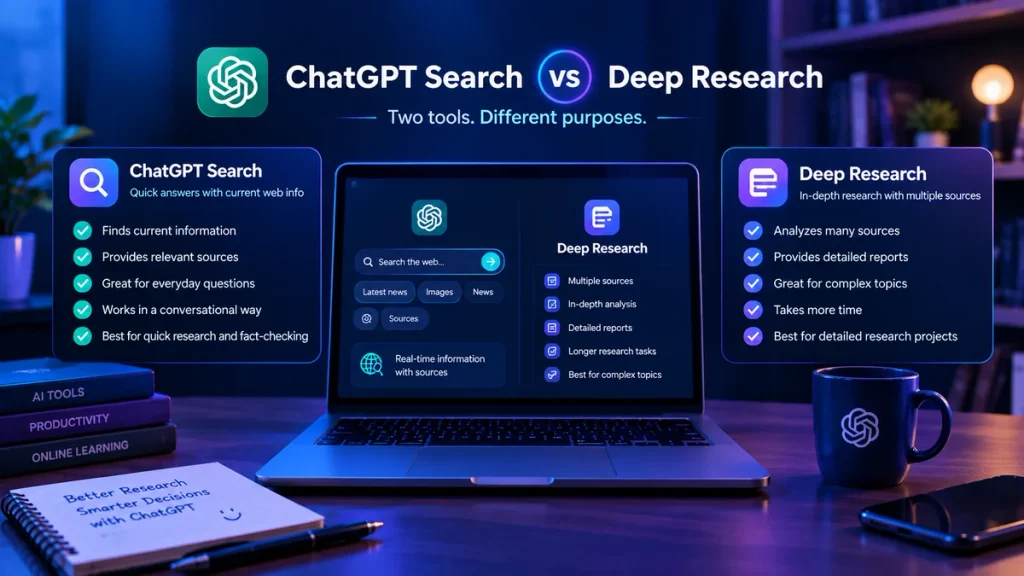
ChatGPT also offers a separate Deep Research capability for more extensive, multi-source investigations.
OpenAI describes Search as useful for quick facts and current information, while Deep Research is intended for deeper, documented research across multiple sources.
So for a simple current question, Search may be enough. For a complicated research project, a deeper research workflow may be more appropriate.
A Simple ChatGPT Search Workflow
If you’re new to web search in ChatGPT, try this workflow:
Ask → Search → Read → Check → Follow up
For example:
Ask:
“What are the current features of Claude AI?”
Search:
Let ChatGPT find current web sources.
Read:
Review the answer and identify the important claims.
Check:
Open official Anthropic pages and other reliable sources.
Follow up:
Ask another question about something that remains unclear.
This keeps ChatGPT as a research assistant rather than treating it as the only source of information.
Is ChatGPT Search Free?
ChatGPT Search is currently available across ChatGPT’s listed Free, Go, Plus, Pro, Business, Enterprise, and Edu plans, with usage subject to plan limits. OpenAI also says that Search can be used by people who are not signed in in supported experiences.
Because ChatGPT plans and limits can change, it is better to check OpenAI’s current documentation rather than relying on an old pricing article.
Frequently Asked Questions
What is ChatGPT Search?
ChatGPT Search is a feature that lets ChatGPT search the web for current information and provide relevant sources with its response.
How do I turn on ChatGPT Search?
Open a ChatGPT conversation, select the tools menu, choose Search, and then enter your question. In supported experiences, you can also use / and select Search.
Can ChatGPT Search the internet?
Yes. ChatGPT can search the web and use current online information when Search is available and relevant to the question.
Does ChatGPT Search show sources?
Yes. ChatGPT Search can provide links to relevant web sources, which you can open to review the original information.
Is ChatGPT Search always accurate?
No. Search can improve access to current information, but ChatGPT can still misunderstand information or make mistakes. Important claims should be checked against the original sources.
What is the difference between ChatGPT Search and Deep Research?
Search is designed for quickly finding current web information and answering questions with sources. Deep Research is designed for more extensive, multi-source research and documented reports.
Final Thoughts
ChatGPT Search is useful when you need information that may have changed since the model’s original training data.
It can help with current technology information, research, news, software features, pricing, and many other topics where freshness matters. The biggest benefit is that you can ask questions naturally and continue exploring the subject through follow-up questions while having access to web sources.
But Search doesn’t remove the need for judgment.
For anything important, check the sources, look at publication dates, and compare information when necessary. Used this way, ChatGPT Search can be a practical research tool rather than simply another place to get quick answers.
And if you’re interested in using ChatGPT for learning rather than web research, check out our guide on How to Use ChatGPT Study Mode.