
If you search for a free AI video generator, you will find plenty of tools that promise a finished video in seconds. I wanted to know what that looks like on a free account, so I opened my existing ImagineArt account, wrote one short prompt, and clicked Generate.
This guide covers what I saw, what the video section offers, what the pricing page shows, and what I could not test. I keep my own results separate from what ImagineArt says about itself, because they are not the same thing.
How I Tested
My test was small. On the morning of 20 November 2026, I logged into an ImagineArt account I had made for an earlier test. An Upgrade button stayed in the top bar the whole time, so I treat it as a free account. I wrote one prompt, used the default settings, and clicked Generate once.
I did not try another model, change the video length, turn the audio off, make a video from an image, or watch a finished video, for reasons I explain below. Everything about features I did not use comes from ImagineArt’s own menus and pricing page. Prices and offers change often, so check the official ImagineArt pricing page before you pay.
What the Video Section Looks Like
I opened the Edit Tools, Image Tools, and Ad Studio menus before I found the video one, so the menus took me a little while to learn. The video page opens on “Choose a Mode,” with Create Video, Extend Video, Edit Video, and Lipsync, and more modes below them.
The Video Tools menu lists features on the left and models on the right.
The Video Tools menu lists these features: Create Videos, Animate Images, Lipsync, Video Extend, Edit Video, AI Captions, Video Reframe, Video Recolor, and Video Upscale. Its model list includes Kling 4 Flash, Seedance 2.5 Flash, Kling 4.0, Seedance 2.5, MiniMax Hailuo H3 Max, Flux 3 max, and Google Omni Flash 1.2. A separate Ad Studio menu offers Video Ads and Image Ads.
I only used Create Video. The descriptions in the menu, such as “Fast, realistic video in seconds” for Kling 4 Flash, are ImagineArt’s words, not my results.
My Prompt and Settings
On the Create Video page, I typed this prompt:
A cup of tea on a wooden table, steam rising, soft morning light
My prompt and the default settings, before I clicked Generate.
The page had a prompt box with an Enhancer button, and it showed these defaults: the Seedance 2.5 model, a 16:9 ratio, a 4-second length, 720p quality, and the Generate Audio switch turned on. On the right, an Effects panel listed camera presets such as Pan Right, Tilt Up, Push In, Pull Out, and Zoom In. I did not touch the Enhancer or any effect.
16:9 is the usual shape for YouTube videos, but I did not upload anything, so I cannot say how this tool works for YouTube.
What Happened When I Clicked Generate
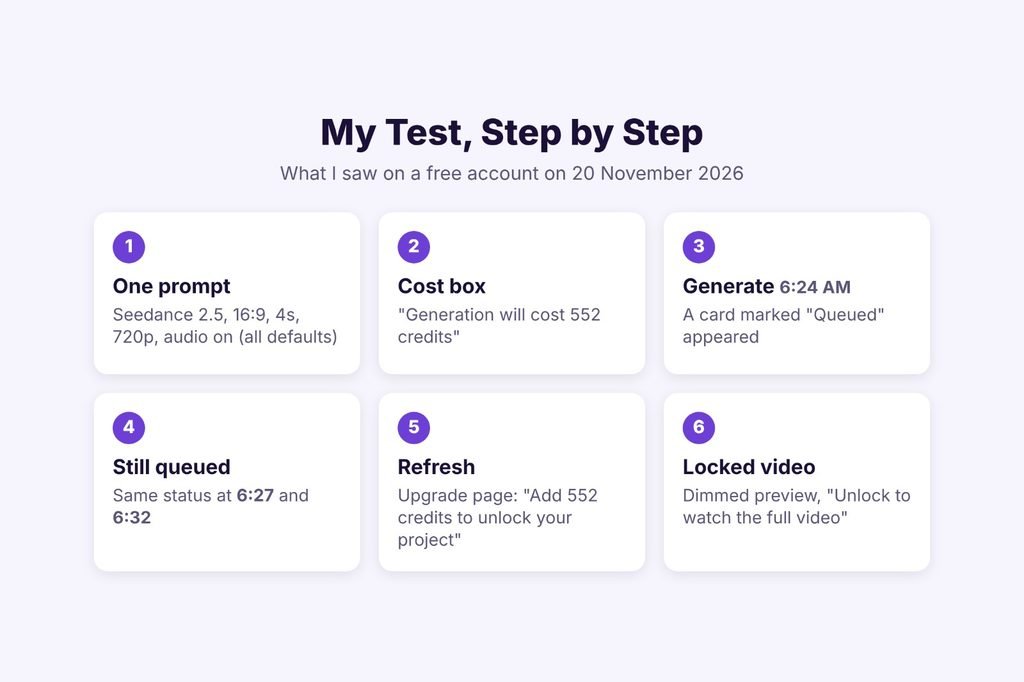
Before I clicked, a small box near the Generate button said: “Generation will cost 552 credits | Generations left: 0.” Below it was a line about “Only 475 credits on Creator” with an Upgrade link. I do not know exactly what “Generations left: 0” means, and I am not sure about the second line, so I only quote them here.
The credit box, with my video already showing as “Queued.”
I clicked Generate once, at 6:24 AM. The History area showed a card marked “Queued.” At 6:27 and again at 6:32, it still said “Queued.” While I waited, the card showed tips like downloading the desktop app and inviting friends to earn credits.
I refreshed the page. After a few seconds of grey loading boxes, a full-screen upgrade page appeared with the message: “Your first AI video is almost ready! Get started now! Add 552 credits to unlock your project with our exclusive offer.”
The upgrade page that appeared after I refreshed.
For comparison, in my earlier image test on the same account, two images used 73 of my 100 free daily credits. A 552-credit price for four seconds of video is far above that.
Could I Watch the Video?
No. When I closed the upgrade page, my video was in History, but it was locked. The card showed a dimmed preview frame: a mug on a wooden table by a window, with what looked like steam rising. Over it were the words “Unlock to watch the full video” and an “Upgrade to view” button.
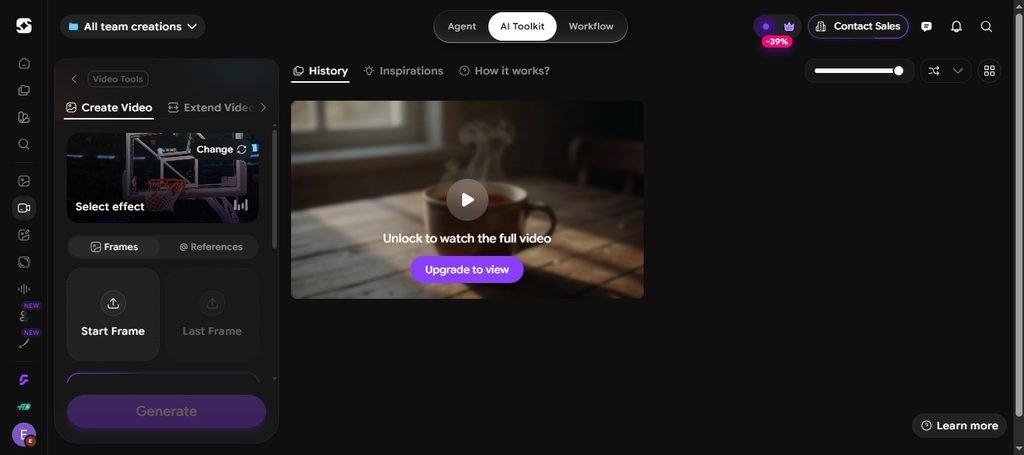
My video as it appeared on the free account.
I clicked the play button, and it took me back to the same upgrade page. So ImagineArt appears to have made the video, but I could not see it. I judged only one dimmed frame, so I cannot say anything about motion, audio, or overall quality. I also did not check whether I could download it.
How Much Does ImagineArt’s AI Video Generator Cost?
On the same day, the upgrade page showed prices in Pakistani rupees, billed yearly. These were promotional prices, so treat them as a snapshot.
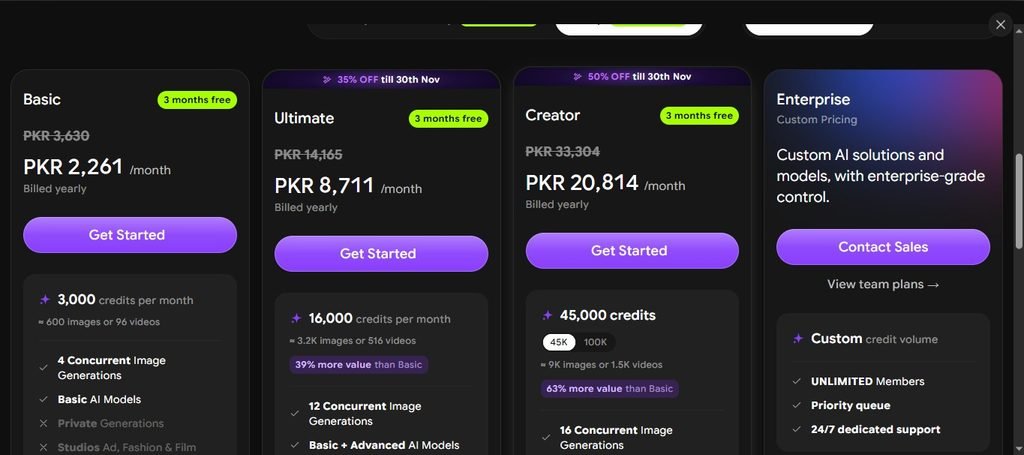
The plans I saw on 20 November 2026.
- Basic: PKR 2,261 per month (crossed out from PKR 3,630). It lists 3,000 credits per month, roughly 600 images or 96 videos, and basic AI models.
- Ultimate: PKR 8,711 per month (from PKR 14,165), with a “35% off till 30th Nov” label. It lists 16,000 credits per month, roughly 516 videos, and “Unlimited Models” for 10 models.
- Creator: PKR 20,814 per month (from PKR 33,304), with “50% off till 30th Nov.” It lists 45,000 credits (with a 100K option), roughly 1.5K videos, and “Unlimited Models” for 20 models.
- Enterprise: custom pricing, with unlimited members, priority queue, and 24/7 support.
The page also offered Monthly, Quarterly (“2 months free”), and Yearly (“3 months free”) options, and separate tabs for Individual and Business plans. A Black Friday banner advertised “up to 50% off every video,” and lists showed small discounts on specific models, such as Seedance 2.5.
Here is a puzzle I noticed. ImagineArt’s estimate of about 96 videos for 3,000 credits works out to roughly 31 credits per video, while my one 4-second Seedance 2.5 video was priced at 552 credits. That suggests the cost depends heavily on the model and settings. I did not check which model the estimate uses, so this is only my arithmetic.
Is There a Free AI Video Generator Here?
If you are wondering how to make an AI video for free, my answer is this: not with the default settings on my account. ImagineArt’s subscription documentation, which I read for an earlier article, lists a free plan with 100 credits per day. My video was priced at 552 credits, so it did not fit.
One important detail is that I used Seedance 2.5 for this test. ImagineArt’s current video page lists this model among the premium options available on paid plans. I did not test an in-house model from the free plan, so my experience does not establish whether every video option requires payment.
I did not test a cheaper model, a shorter clip, or turning off audio, so I cannot tell you whether any of those would have worked for free. If you try, check the credit box before you click Generate, and see whether it changes when you pick another model. That is a suggestion, not something I tested.
Making a Video From an Image or a Character
Many people search for ways to generate a video from an image. The menu lists “Animate Images” (“Add motion to images”), and the Create Video page showed Start Frame and Last Frame upload boxes. It also lists Lipsync, described as “Create Talking Videos,” which may matter if you want a character AI video generator. I did not use any of these, so I can only report what the menu says.
Who Might Like This AI Video Generator?
Based on my small test, it may suit people who are comfortable paying for credits and want many models in one place, such as marketers and creators who make short clips often. It may be a poor fit if you want a video straight from a free account without reading the credit rules first.
What I Would Do Differently Next Time
Looking back at my test, there are three things I would change. First, I would read the credit box before clicking Generate, instead of after I had already waited in the queue. Second, I would write down my remaining credits before and after, so I could say exactly what the video used. Third, I would try a shorter, cheaper setup first, and only then a longer clip.
What I Did Not Test
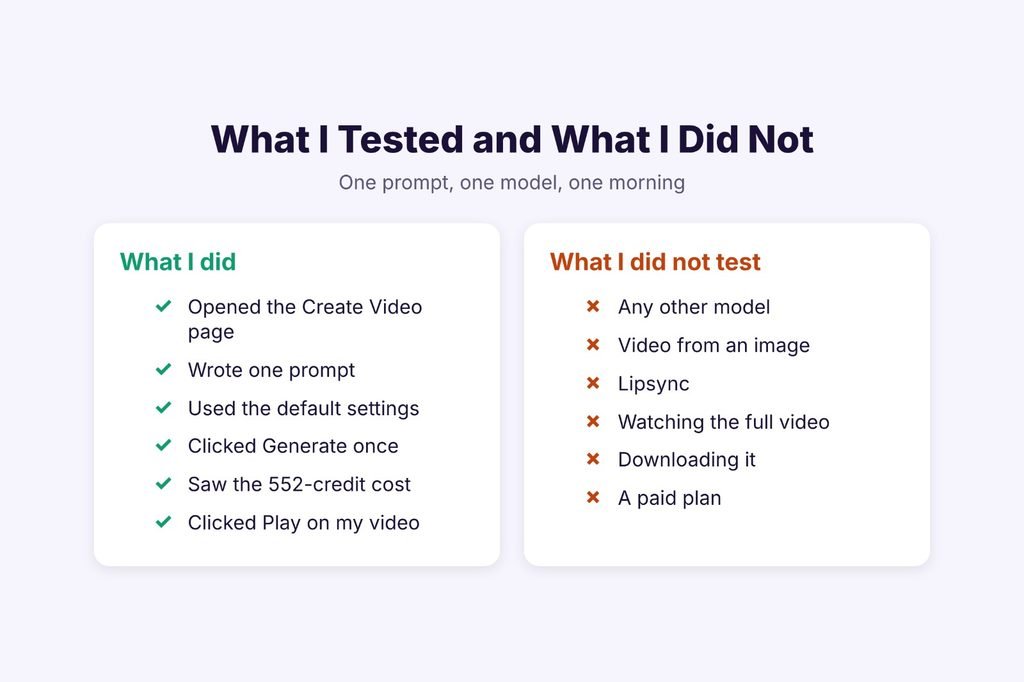
I made one video, from one prompt, on one model, on one morning. I did not watch the result, change any setting, try another model, upload an image, use Lipsync, or pay for a plan. A paid account could behave very differently, and the queue may have been slow on that day. Please treat this as a first look, not a full review.
Frequently Asked Questions
Can I make a free AI video on ImagineArt?
Not in my test. The video was priced at 552 credits, and on my free account it stayed locked behind an “Upgrade to view” button.
How many credits did my video cost?
The box near the Generate button said 552 credits for a 4-second, 720p video on Seedance 2.5 with audio on.
Did the video generate?
It seems so. A locked preview card appeared in History, but I could not watch it.
How long was my video in the queue?
I clicked Generate at 6:24 AM, and it was still marked “Queued” at 6:32 AM. After a refresh a few minutes later, the locked video appeared.
Can I use it as a YouTube AI video generator?
I did not test that. The default ratio was 16:9, which is common for YouTube, but I did not upload a video.
Final Thoughts
ImagineArt’s video section is easy to find once you know where to look, and its menu shows a long list of video tools and models. In my test, though, a free account could not watch a four-second video, because the price was 552 credits and the result was locked. If you want to try an AI video generator, read the credit cost before you click, and compare it with the plan you can afford. Test on a small scale first, and decide after you have seen your own result. One thing I did like is that the price appeared before I clicked, so I knew the cost up front. What I did not like is that I only learned the video was locked after waiting several minutes.