If you’re looking for an AI assistant for writing, research, coding, or everyday work, you’ll likely come across Claude.
Developed by Anthropic, Claude is designed to handle conversations, analyze information, work with files, generate and edit content, write code, and help with more complex tasks. It is available through the web, desktop, and mobile apps, with different plans offering different usage limits and features.
But is Claude actually worth using in 2026? How does it compare with other AI assistants, and which type of user can get the most value from it?
This Claude AI review looks at its main features, pricing, strengths, limitations, and common use cases so you can decide whether it fits your needs.
What Is Claude AI?
Claude is an AI assistant developed by Anthropic. It is a large language model designed for tasks involving language, reasoning, analysis, coding, and other types of knowledge work.
You can access Claude through a web browser, desktop applications for Mac and Windows, and mobile apps for iOS and Android.
Unlike a traditional search engine, Claude is designed to have a conversation with you. You can ask a question, follow up on the answer, provide additional information, upload a file, or ask it to change its response.
That makes it useful for both simple everyday tasks and more involved projects.
What Can You Use Claude For?
Claude is not limited to one particular type of task. What you can do with it also depends on your plan, model, and available features.
Writing and Editing
Claude can help with drafting, rewriting, summarizing, brainstorming, and editing.
For example, you can use it to:
- Brainstorm blog topics
- Rewrite unclear paragraphs
- Summarize long text
- Create outlines
- Improve the structure of a document.
- Adjust the tone of writing.
- Generate ideas for emails or other content.
It can also work through several rounds of editing instead of requiring you to start over each time.
Research and Information
Claude can help organize information, explain difficult subjects, compare ideas, and work through large amounts of text.
Its current Claude experience also includes web search, while paid plans offer access to Research for more involved research tasks.
However, AI-generated information should still be checked when accuracy matters, particularly for legal, financial, medical, or other high-stakes topics.
Coding
Claude is also widely used for coding and technical work.
It can help explain code, find errors, generate code, and work through programming problems.
Anthropic also offers Claude Code, a separate coding-focused tool included with the Pro plan and available through higher plans.
We’ll cover Claude Code in more detail in a separate article because it deserves its own guide.
Working With Files
Claude can work with files and documents as part of supported Claude workflows. This can be useful when you want to summarize a document, analyze information, or ask questions about material you’ve provided.
The Free plan currently includes file creation and code execution, while availability and limits can vary by plan.
Creating and Analyzing Content
Claude can also help create content and work with different types of information. Depending on the task and available features, users can use it for writing, coding, data-related work, and other knowledge tasks.
Key Claude AI Features
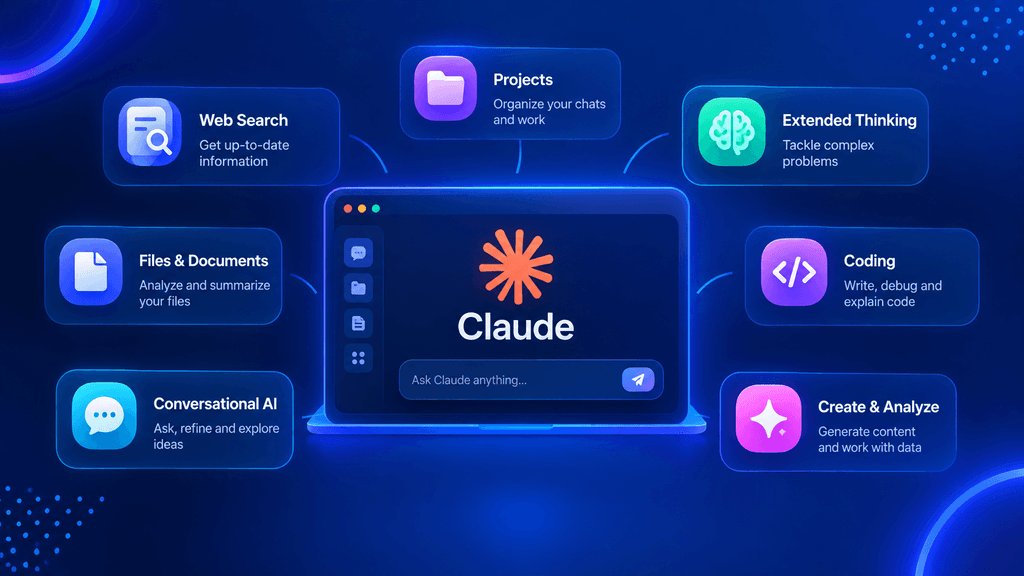
Claude has developed beyond a basic chatbot. Some of its features are particularly useful for people who use AI regularly.
Conversational Follow-Ups
One useful part of Claude is the ability to continue a conversation rather than treating every question as a completely separate request.
You can ask it to rewrite an answer, explain something differently, shorten it, or continue working from the previous response.
This can make longer tasks easier to manage.
Web Search
Claude can search the web for information when the feature is available to your account.
This is useful when you need more current information rather than relying only on the model’s existing knowledge.
Still, web search doesn’t mean every answer is automatically correct. Important information should be checked against reliable sources.
Projects
Claude’s paid Pro plan currently includes unlimited projects for organizing chats and documents. Projects can be useful when you’re working on an ongoing task instead of a one-time question.
For example, you could organize work around a particular research project, writing project, or other long-term task.
Extended Thinking
Claude also supports extended thinking for more complex work. The exact capabilities depend on the model and plan you’re using.
The current model lineup includes different options with different levels of speed, capability, context, and pricing.
Claude Cowork
Claude also includes Cowork, a desktop-focused way to work with Claude on longer tasks. Anthropic currently lists Cowork as a Pro feature alongside Claude Code and other advanced capabilities.
This makes Claude more than a simple chat interface for users who want to use AI as part of a larger workflow.
Claude Models in 2026
One thing that can make Claude confusing for new users is its model lineup.
Anthropic currently lists Claude Fable 5.1, Claude Opus 5.5, Claude Sonnet 5, and Claude Haiku 4.5 among its current models. They are designed with different priorities in mind.
For example:
- Claude Fable 5.1 — aimed at demanding reasoning and long-horizon agentic work.
- Claude Opus 5.5 — designed for long-running agentic coding and knowledge work.
- Claude Sonnet 5 — positioned as a balance between speed and intelligence.
- Claude Haiku 4.5 — designed for faster work while retaining strong capabilities.
If you’re unsure which model to choose, Anthropic currently recommends starting with Opus 5.5 for most workloads and moving to Fable 5.1 for especially demanding reasoning or long-horizon agentic work.
We’ll cover the model selection question separately in our upcoming Which Claude Model Should You Use? guide.
Claude AI Pricing in 2026

Claude currently has several plans, including Free, Pro, Max, Team, and Enterprise. Pricing and available features can vary by plan and location.
Claude Free
The Free plan costs $0 and gives users access to Claude without a subscription.
According to Claude’s current pricing page, the Free plan includes features such as:
- Chat on web, desktop, and mobile.
- Writing and content creation
- Code generation
- Data visualization
- Web search
- Memory across conversations
- File creation and code execution
- Some integrations and extensions
Usage limits apply.
For someone who wants to try Claude before paying, the Free plan provides a reasonable starting point.
Claude Pro
Claude Pro is currently $20 per month when billed monthly in the US. Anthropic also lists an annual option equivalent to $17 per month, billed upfront at $200.
Pro adds features such as:
- More usage than the Free plan
- Priority access during busy periods
- Claude Code
- Claude Cowork
- Claude Design
- Claude Science
- Unlimited projects
- Research
- Access to more Claude models
- Microsoft 365 integration
The exact limits and features can change, so checking Claude’s current pricing page before subscribing is sensible.
Claude Max
Max is designed for users who need substantially more usage than Pro.
Claude currently lists Max plans starting at $100 per month, with options providing 5x or 20x the usage of Pro.
This is more relevant to heavy users than someone who only occasionally uses an AI assistant.
Team and Enterprise
Claude also offers plans for organizations that need team collaboration and enterprise features.
The right business plan depends on the organization’s size, requirements, security needs, and usage.
Claude AI Pros and Cons
Pros
- Strong writing and editing capabilities
- Useful for research and knowledge work
- Supports coding and technical tasks
- Web search is available
- File and document workflows
- Multiple models for different workloads
- Desktop and mobile access
- Advanced features available on paid plans
- Claude Code included with Pro
Cons
- Usage limits still apply
- Advanced features require paid plans
- Pricing and model availability can change
- Different models can make the platform confusing for beginners
- AI responses can still contain mistakes
- Important information should be independently verified
The last point is particularly important. Even when an AI assistant produces a confident and well-written answer, that does not guarantee that every detail is correct.
Is Claude AI Good for Writing?
Claude can be useful for writing because it can help with both the first draft and later editing.
For example, a blogger might use Claude to brainstorm an outline, improve a paragraph, summarize research notes, or suggest ways to make an explanation clearer.
However, using AI doesn’t remove the need for human editing.
If you’re publishing content on a website, you should still check facts, add useful original information, improve the structure, and make sure the final article actually helps the reader.
Is Claude AI Good for Coding?
Claude can be useful for coding, especially when you need help understanding code, solving problems, or working through a larger programming task.
For developers who want a more coding-focused experience, Claude Code provides a separate workflow designed specifically for software development. Anthropic describes Claude Code as part of its broader Claude product ecosystem, and Pro currently includes access to it.
However, generated code should still be reviewed and tested rather than blindly copied into a production project.
Claude AI vs ChatGPT
Claude and ChatGPT are both general-purpose AI assistants, but they have different products, features, models, and pricing structures.
The better option can depend on what you actually need.
For example, someone primarily interested in writing and document-based work may have different requirements from a developer looking for an AI coding workflow.
Rather than choosing based only on which AI is more popular, it makes more sense to compare the specific features and workflows you expect to use.
A detailed Claude vs ChatGPT comparison will be covered separately.
Who Should Use Claude AI?
Claude can be useful for several types of users.
Writers and Bloggers
Writers can use Claude for brainstorming, outlining, editing, summarizing, and content development.
Students
Students can use it to explain concepts, organize notes, summarize material, and practice understanding difficult subjects.
It should be used as a learning aid rather than a replacement for actually understanding the material.
Developers
Developers can use Claude for coding help, debugging, explanations, and more advanced development workflows through Claude Code.
Freelancers
Freelancers can use Claude for drafting emails, organizing information, brainstorming ideas, summarizing documents, and handling repetitive writing tasks.
Businesses
Businesses can use Claude for research, writing, knowledge work, coding, and team workflows. The appropriate plan depends on the organization’s requirements.
Is Claude AI Safe and Trustworthy?
Claude is developed by Anthropic with a stated focus on building AI systems that are helpful, honest, and safe. Anthropic describes Claude as being trained using its Constitutional AI approach.
That said, “safe” doesn’t mean that every response should automatically be trusted.
AI systems can make mistakes, misunderstand a request, or provide incorrect information. Users should therefore verify important information, particularly when the consequences of an incorrect answer could be serious.
It’s also worth remembering that Claude’s features and policies can change as the product develops.
Is Claude AI Worth It in 2026?
Whether Claude is worth paying for depends on how frequently you use it and which features you need.
The Free plan gives people a way to try Claude without paying. For users who need more usage and features such as Claude Code, Research, Projects, and access to additional models, Pro provides a broader set of capabilities.
Heavy users may have different requirements and may consider Max or business plans.
So instead of asking whether Claude is worth it for everyone, the more useful question is whether its features match the work you want to do.
Claude AI Alternatives
Claude is not the only AI assistant available.
Depending on your needs, alternatives include:
- ChatGPT
- Google Gemini
- Microsoft Copilot
- Perplexity
- Other specialized AI tools
Each platform has its own combination of models, features, pricing, integrations, and limitations.
If you’re specifically looking for alternatives to Claude, a separate comparison guide can help you look at those options in more detail.
Frequently Asked Questions
Is Claude AI actually good?
Claude can be useful for writing, research, coding, document work, and other knowledge tasks. Whether it works well for you depends on the type of work you need it to handle.
Is Claude as good as ChatGPT?
There isn’t one answer that applies to every task. Claude and ChatGPT have different features, models, and workflows. The better fit depends on what you need from an AI assistant.
Is Claude AI free?
Yes. Claude has a Free plan with limited usage. Paid plans provide additional usage and features.
How much does Claude Pro cost?
Claude Pro currently costs $20 per month when billed monthly in the US. Anthropic also lists an annual option equivalent to $17 per month, billed as $200 upfront.
What is Claude Code?
Claude Code is Anthropic’s coding-focused tool for working on software development tasks with Claude. It is currently included with Claude Pro and available through higher plans.
Which Claude model should I use?
It depends on the task. Anthropic currently recommends starting with Claude Opus 5.5 for most workloads, while Fable 5.1 is aimed at more demanding reasoning and long-horizon agentic work. Sonnet 5 focuses on balancing speed and intelligence, while Haiku 4.5 is designed for faster work.
Final Thoughts
Claude has grown into more than a simple AI chatbot. It now combines conversational AI with writing, research, coding, file work, web search, projects, and other productivity features.
Its different plans and models also mean that users can choose an experience based on how heavily they use AI and what type of work they need to accomplish.
For a beginner, the Free plan is a practical way to explore Claude before deciding whether a subscription is necessary. More advanced users may find features such as Research, Projects, Claude Code, Cowork, and access to additional models more relevant.
Overall, Claude is worth considering if you’re looking for an AI assistant for writing, research, coding, or general knowledge work. But the right choice ultimately depends on your specific workflow rather than simply choosing an AI because it is popular.