AI image generators have changed the way people create visuals. Instead of spending hours designing an image from scratch, you can now describe what you want and let an AI tool turn that idea into a visual.
But with so many AI image generators available today, choosing the right one can be confusing.
Leonardo AI is one of the platforms that stands out because it goes beyond simple text-to-image generation. It combines image generation, image editing, image-to-image workflows, video generation, upscaling, and other creative tools in one platform.
I tested its image-generation workflow to see how practical it is for beginners, content creators, designers, marketers, and anyone who needs AI-generated visuals.
In this Leonardo AI review, I’ll cover its main features, pricing, how to use it, its strengths and limitations, and whether it is actually worth trying in 2026.
What Is Leonardo AI?
Leonardo AI is a generative AI platform designed for creating and editing visual content.
You can use it to generate images from text prompts, transform existing images, edit visuals, create videos, upscale images, and maintain more consistent characters and styles across different creations.
One thing I like about Leonardo AI is that it is not limited to one type of visual creation. Instead, it works more like a creative workspace where you can move from an idea to a finished visual without constantly switching between different tools.
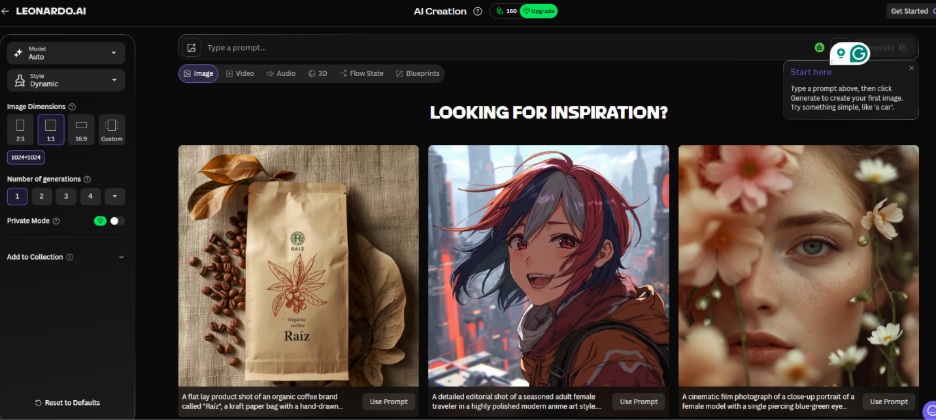
Leonardo AI provides a creative workspace for generating, editing, and refining AI visuals.
Leonardo AI Features
Leonardo AI offers several features, but these are some of the ones most useful for everyday creators.
1. Text-to-Image Generation
The most basic way to use Leonardo AI is by describing the image you want through a text prompt.
You can describe the subject, environment, lighting, style, mood, camera angle, and other details.
For example:
Photorealistic young woman working on a laptop in a modern coffee shop, natural daylight, realistic photography, soft background blur, professional lifestyle photography.
Leonardo can turn a prompt like this into a complete visual. The platform supports both photorealistic and artistic styles.
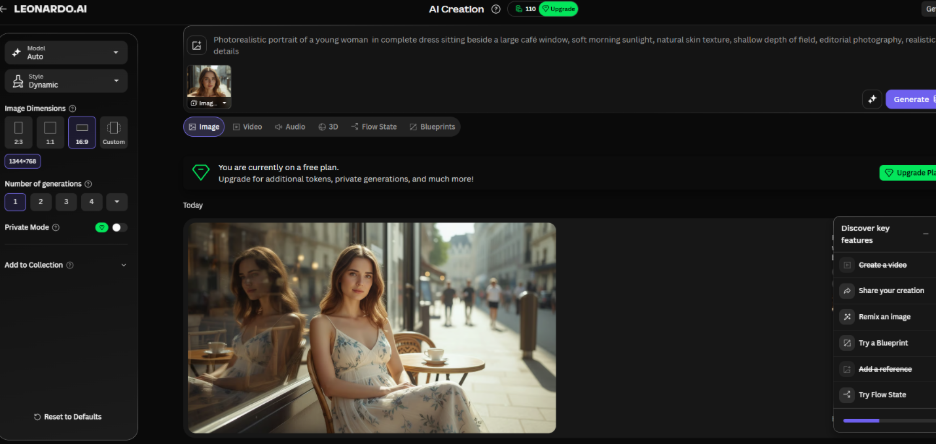
Example of an AI-generated image created from a text prompt.
For beginners, this is probably the easiest place to start.
When I tested Leonardo AI’s text-to-image feature, I noticed that the quality of the result depended a lot on how clearly I described what I wanted.
A short prompt gave me a more general result, while adding details about the subject, style, lighting, and composition gave me a more specific image. This made the feature feel much more practical for creating visuals for different types of projects.
2. Image-to-Image Generation
Leonardo AI can also work with an existing image instead of starting completely from text.
This can be useful when you already have a visual but want to change its style, appearance, or overall direction.
For example, you could start with a realistic photograph and transform it into a more cinematic or artistic version..
The important thing here is that image-to-image generation gives you more control than simply writing a new prompt from scratch.
You can provide an existing visual as a reference and guide the result from there.
3. AI Image Editing
Leonardo also includes AI-powered editing tools that allow you to refine an existing image instead of recreating everything from the beginning.
You can use AI editing to change or improve parts of an image while keeping important elements of the original visual.
This can be particularly useful when you like most of an image but want to make a few changes.
For example, you might want to:
- change an object
- adjust part of the background
- modify details
- refine the overall appearance
- expand or improve an image
Leonardo’s current image editor supports prompt-based editing and image references, making it possible to refine visuals without relying entirely on traditional manual editing workflows.
4. Image-to-Video Generation
Leonardo is not limited to static images.
The platform also provides AI video tools that can turn still images into short video content.
This can be useful for:
- social media content
- short promotional videos
- visual storytelling
- creative experiments
- marketing content
Instead of creating a video completely from scratch, you can begin with an image and use AI to add motion.
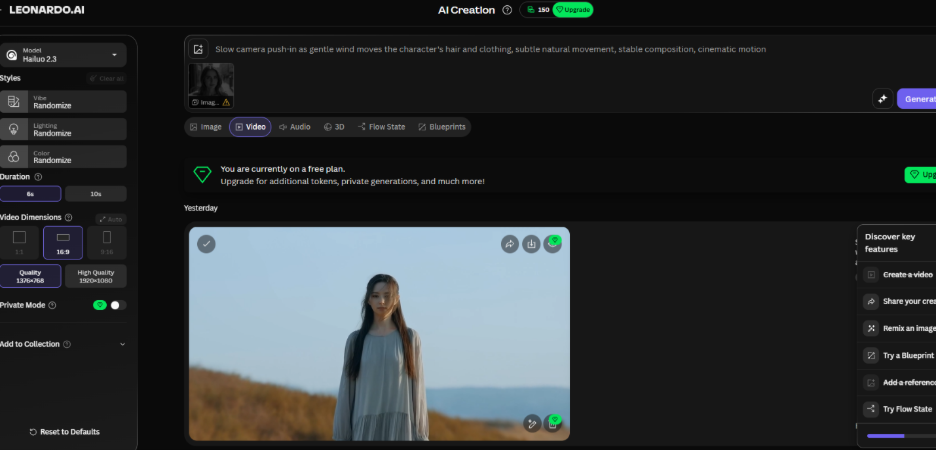
I also tested the image-to-video workflow by taking a still image and turning it into a short video. What I found useful was that I did not have to create the entire video from scratch.
Starting with an existing image made the process feel simpler, especially when I wanted to give a static visual some movement.
5. AI Image Upscaling
Another useful feature is image upscaling.
Sometimes an AI-generated image looks good but does not have enough resolution for the way you want to use it.
Leonardo provides upscaling tools designed to improve image resolution and clarity so visuals can be prepared for websites, social media, presentations, and other uses.
For bloggers and content creators, this can be especially useful when an image needs to look cleaner and sharper before being published.
6. Consistent Characters and Styles
One challenge with AI image generation is consistency.
You may create a character you really like, but when you generate another image, the character can look completely different.
Leonardo includes tools designed to help maintain consistency across characters, styles, and brand elements.
This can be useful for:
- storytelling
- marketing campaigns
- social media content
- character design
- brand visuals
- creative projects
For creators who need multiple visuals that feel connected, this can save a lot of time.
7. Blueprints and Creative Workflows
Leonardo also provides Blueprints and other structured workflows that can help creators move from an idea to a finished visual more efficiently.
This is useful if you do not want to figure out every setting manually.
Instead of treating Leonardo as only an image generator, you can think of it as a broader creative platform with different tools for creating, editing, refining, and scaling visual content.
How to Use Leonardo AI
If you are completely new to Leonardo AI, the basic workflow is fairly simple.
Step 1: Create an Account
Start by creating or logging into your Leonardo AI account.
Step 2: Enter Your Prompt
Describe what you want to create.
Try to include:
- subject
- environment
- visual style
- lighting
- mood
- important details
For example:
A modern home office with a laptop, warm natural lighting, minimal interior, realistic photography, clean professional atmosphere.
Step 3: Choose Your Settings
Depending on the workflow and model you use, you can adjust available settings and choose a suitable model or style.
Leonardo currently provides access to different models and creative workflows, so the available options can change over time.
Step 4: Generate Your Image
Submit the prompt and allow Leonardo to generate the visual.
You may need to experiment with your prompt if the first result does not match your expectations.
Step 5: Refine the Result
If you like the overall image but want to change something, use the available editing, guidance, or refinement tools instead of starting completely from zero.
Step 6: Upscale and Download
Once you are happy with the result, you can upscale and export the final visual for your project.
How to Write Better Leonardo AI Prompts
Your prompt has a major impact on the final result.
Instead of writing:
A woman working.
Try something more specific:
Photorealistic young woman working on a laptop in a bright modern home office, soft morning sunlight coming through the window, natural skin texture, neutral colors, shallow depth of field, professional lifestyle photography.
The second prompt gives the AI much more information to work with.
A useful prompt structure is:
Subject + Environment + Style + Lighting + Mood + Important Details
You do not always need an extremely long prompt. Clear and specific instructions are usually more useful than adding random words.
Leonardo AI Pricing
Leonardo AI currently offers both free and paid plans.
The Free plan is $0/month and includes 150 fast tokens per day, along with basic quality settings and other limitations.
Paid individual plans currently include:
- Essential: $12/month
- Premium: $30/month
- Ultimate: $60/month
These are the current monthly prices shown on Leonardo’s official pricing page; yearly billing can reduce the effective monthly price.
The paid plans provide larger token allowances, private generations, enhanced quality settings, more personal AI models, and higher generation limits. Premium and Ultimate also support relaxed image generation on selected models after the fast-token allocation is used.
Because AI tools frequently change their pricing and plans, it is worth checking the official pricing page before subscribing.
Can You Use Leonardo AI for Free?
Yes.
Leonardo currently provides a free plan with a daily token allowance, so beginners can try the platform without immediately paying for a subscription.
The free plan is useful if you simply want to experiment with AI image generation.
However, if you need higher usage, private generations, enhanced settings, or more advanced workflows, you may eventually need a paid plan.
Can You Use Leonardo AI Images Commercially?
Yes, but the usage rights depend on your subscription status.
According to Leonardo’s current pricing information, paid subscribers retain ownership and intellectual property rights to their generated images and can use them for commercial projects.
Free-tier users are granted a non-exclusive, royalty-free license to use generated content commercially, while Leonardo retains rights to the images created under the free tier.
If you plan to use Leonardo-generated images for client work, products, advertising, or other commercial purposes, always check Leonardo’s latest terms before relying on a particular usage right.
Who Should Use Leonardo AI?
Leonardo AI can be useful for several types of users.
Bloggers and Content Creators
You can create original visuals for blog posts, articles, thumbnails, and social media content.
Designers
Designers can use AI generation as a starting point for concepts, ideas, and visual exploration.
Marketers
AI-generated visuals can help with social media campaigns, promotional concepts, and creative testing.
Small Businesses
Small businesses can experiment with product visuals, social media graphics, and marketing ideas without creating every visual manually.
Beginners
The free plan makes it possible to experiment before deciding whether a paid subscription is necessary.
What I Like About Leonardo AI
After exploring its image-generation workflow, these are some of the things that stand out to me:
- It offers a free plan for beginners.
- It supports both image and video creation.
- It includes image-to-image workflows.
- It provides AI-powered editing tools.
- It includes upscaling features.
- It offers tools for maintaining visual consistency.
- It brings multiple creative workflows into one platform.
The biggest advantage, in my opinion, is that you are not limited to one simple text-to-image feature.
You can generate something, refine it, edit it, upscale it, and even move toward video creation within the same ecosystem.
What Could Be Better?
Leonardo AI is powerful, but that does not mean every result will be perfect.
Beginners may need some time to understand the different models, settings, prompts, and workflows.
Another thing to consider is the token system. Your usage depends on the computational cost of the actions you perform, so more complex workflows can consume more tokens.
The platform also has many features, which can feel slightly overwhelming if you only want a very simple image generator.
So, if your needs are basic, you may not need every feature Leonardo offers.
Leonardo AI Pros and Cons
Pros
- Free plan available
- Strong image generation
- Image-to-image capabilities
- AI image editing
- Video generation
- Image upscaling
- Character and style consistency tools
- Multiple creative workflows in one platform
Cons
- Beginners may need time to understand all the tools
- Token usage can become important for frequent users
- Advanced features are mainly more useful for serious creators
- Results still depend heavily on prompt quality
Is Leonardo AI Worth It in 2026?
For me, the answer depends on what you need.
If you only want to create an occasional AI image, the free plan is a good way to experiment without committing to a subscription.
But if you are a content creator, designer, marketer, or business owner who regularly needs visual content, Leonardo becomes more interesting because it combines image generation, editing, video, upscaling, and other workflows in one platform.
I would recommend starting with the free plan first.
Use it for a few projects, test different prompts, explore the tools, and see whether the workflow actually fits your needs.
If you find yourself using it regularly, then you can decide whether a paid plan makes sense.
Frequently Asked Questions
Is Leonardo AI free?
Yes. Leonardo AI currently offers a free plan with a daily allocation of fast tokens. Paid plans provide larger allowances and additional features.
Is Leonardo AI good for beginners?
Yes. Beginners can start with the free plan and gradually explore more advanced tools as they become comfortable with AI image generation.
Can Leonardo AI generate realistic images?
Yes. Leonardo supports photorealistic as well as artistic image styles. The final quality depends on the selected model, prompt, and settings.
Can Leonardo AI turn images into videos?
Yes. Leonardo provides image-to-video tools that can animate still images into short video content.
Can Leonardo AI edit existing images?
Yes. Leonardo provides AI-powered image editing tools that allow users to refine and modify existing visuals.
Can Leonardo AI images be used commercially?
Yes, but the exact rights differ between free and paid users. Always check the current Leonardo terms for your specific use case.
Which Leonardo AI plan should beginners choose?
For someone just getting started, the free plan is the easiest option because it allows you to test the platform before spending money.
Final Verdict
Leonardo AI is more than a basic AI image generator.
It combines image creation with editing, image-to-image workflows, video generation, upscaling, and tools for maintaining consistent visual styles.
The free plan makes it easy for beginners to test the platform, while the paid plans are aimed at users who need more generation capacity and advanced features.
If you regularly create visuals for blogs, social media, marketing, design, or other creative projects, Leonardo AI is definitely worth trying.
My suggestion is simple: start with the free plan, experiment with different prompts, and upgrade only when you actually need the additional capacity or features.
Want to try Leonardo AI?
You can explore the platform and see which features fit your workflow before deciding whether you need a paid plan.
Disclosure: This article may contain affiliate links. If you purchase through a link on this page, we may earn a commission at no additional cost to you. This helps support the website and allows us to continue publishing useful AI tool reviews.