
Cybersecurity for beginners starts with understanding how to protect your devices, online accounts, and personal information from digital threats. Whether you use the internet for studying, shopping, freelancing, or running a business, your data can be at risk from phishing messages, stolen passwords, malware, and unsafe security settings.
Cybersecurity may sound complicated, but protecting yourself does not always require advanced technical knowledge. Simple habits, such as enabling two-step verification, keeping software updated, and checking links before opening them, can help reduce common risks.
While researching this topic, I noticed that many security problems begin with ordinary mistakes rather than sophisticated hacking techniques. Artificial intelligence can help security teams identify suspicious activity, but it cannot prevent every attack. Understanding common threats and building safer online habits are important first steps toward better digital security.
How I Researched This Article
I reviewed published security guidance, vendor documentation, and standards such as the NIST Cybersecurity Framework. I did not test every security product mentioned here. The one thing I tested myself was 2-Step Verification on my own Google account, which I describe in a separate section below. Anything labeled as a scenario is an illustration, not a real case.
What Are the Main Types of Cybersecurity?
Cybersecurity covers several areas because computers, networks, applications, and online accounts face different risks. Understanding these areas makes it easier to see how digital information is protected and why no single security measure can address every threat. The following five types provide a useful starting point for beginners.
Network Security
Network security protects the connections that allow computers, servers, and other devices to communicate with one another. It helps prevent unauthorized access to networks and the information they carry. Firewalls, secure network settings, and access restrictions are common ways to reduce security risks.
For example, a home Wi-Fi network protected with a strong password is generally safer than one left open for anyone to join. Keeping the router updated and using secure settings can provide additional protection. These measures do not eliminate every risk, but they help create a safer network.
Cloud Security
Cloud security focuses on protecting data, applications, and services stored or accessed through cloud platforms. These platforms provide useful tools for storing files and collaborating online, but their security also depends on how accounts, permissions, and sharing settings are managed.
Even when a cloud provider has strong security measures, an incorrectly configured account or an overly public sharing link can expose confidential information. Reviewing access permissions and checking sharing settings regularly can help reduce this risk.
Here is an illustrative scenario, not a real company. Imagine a small design studio that stores client files in a cloud drive. To share a large project quickly, a team member sets a folder to “anyone with the link can view” and plans to change it later. The project ends, and nobody remembers the setting. Months later, the link appears in a forwarded email, and someone outside the project can open every file. The platform was never hacked, yet the files were exposed.
Now imagine the studio adds three habits: links expire after seven days, one named person reviews access every month, and the platform sends an alert whenever a folder becomes public. The forgotten link would have stopped working on its own. This is a simplified example, but it shows why cloud security is a management task as much as a technical one.
Endpoint Security
Endpoint security focuses on protecting devices such as laptops, desktop computers, and smartphones from cyber threats. These devices can become entry points for attackers if they run outdated software, contain malicious files, or lack appropriate security controls. Security software, device encryption, and regular updates can help reduce these risks.
For example, if you use a laptop for studying, freelancing, or managing client files, installing software updates and avoiding suspicious downloads can help protect your device. If your device supports built-in security features, keeping them enabled can provide another layer of protection.
Application Security
Application security focuses on protecting websites, mobile apps, and software from security weaknesses that attackers could exploit. These weaknesses may expose personal information, allow unauthorized access, or affect how an application works. Developers can reduce these risks by testing their code, fixing vulnerabilities, limiting permissions, and keeping software components updated.
For example, when you use a website to create an account or submit personal information, the website should handle that information securely and prevent unauthorized users from accessing it. Security testing and regular updates help developers identify and fix weaknesses before they lead to bigger problems.
Identity and Access Security
Identity and access security focuses on making sure that only authorized people can access specific accounts, systems, and information. It helps reduce the risk of unauthorized access, especially when login credentials are stolen or misused. Strong, unique passwords, multifactor authentication (MFA), and appropriate access permissions are important parts of this protection.
For example, if you use a cloud drive to store personal or client files, you should give access only to people who need those files. Removing access when it is no longer required and enabling two-step verification on important accounts can help reduce security risks.
Common Cybersecurity Threats
Understanding common cybersecurity threats can help beginners recognize warning signs before they become serious problems. Some attacks aim to steal passwords or personal information, while others use malicious software or deceptive messages to gain access to devices and accounts. Learning how these threats work is an important step toward making safer decisions online.
Readers in Pakistan can also consult the Pakistan National CERT Cybersecurity Handbook for additional cybersecurity guidance.
Phishing and Social Engineering
Phishing is a common cyber threat in which attackers use deceptive emails, text messages, websites, or login pages to trick people into sharing sensitive information or opening harmful files. Social engineering is a broader technique that manipulates people into taking actions that benefit an attacker. These attacks often rely on urgency, fear, curiosity, or trust.
For example, someone might receive a message that appears to come from their bank, asking them to verify their account immediately through a link. The message may look convincing, but the link could lead to a fake login page designed to steal their password.
Before clicking a link or sharing information, check the sender carefully and look for unusual requests, unexpected attachments, or pressure to act quickly. If a message claims to come from a bank, employer, or service provider, contact that organization through its official website or a trusted contact method instead of using the link in the message.
For more online safety advice, see the FBI’s online safety tips.
Malware and Ransomware
Malware is software designed to harm a device, steal information, or give attackers unauthorized access to a system. It can reach a device through malicious downloads, infected attachments, deceptive links, or software that has not been updated. Ransomware is a type of malware that can lock files or systems and demand payment to restore access. In some cases, attackers also threaten to publish stolen information.
For example, a person might download a file from an unfamiliar website without realizing that it contains malicious software. Depending on the malware, the device or its stored information could be put at risk.
To reduce these risks, download software from trusted sources, keep your operating system and applications updated, and avoid opening unexpected attachments. Back up important files regularly and, where possible, keep a backup separate from your main device. Check that your backups work by testing whether you can restore your files. These precautions can reduce the impact of an attack, although they cannot guarantee complete protection.
Credential Theft and Account Takeovers
Credential theft happens when attackers obtain login details, such as usernames and passwords, without permission. They may use phishing messages, information exposed in data breaches, or passwords that people reuse across multiple accounts. Once attackers obtain these details, they may try to access email, social media, banking, or cloud storage accounts.
For example, if you use the same password for your email and another website, a data breach on that website could put your email account at risk too. Attackers may try stolen passwords on other services, hoping that the same credentials will work.
To reduce this risk, use a different, strong password for every account and consider using a reputable password manager to store them securely. Enable multifactor authentication (MFA), especially on your email and other important accounts. If you receive an unexpected login alert, review the activity through the service’s official website and change your password if you suspect unauthorized access.
My Experience Testing Multi-Factor Authentication
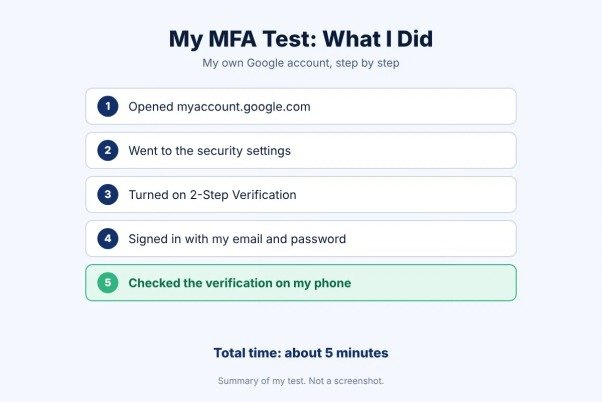
To understand how multifactor authentication works in practice, I enabled Google 2-Step Verification on my own Google account. The setup took approximately five minutes, and I checked how the additional verification step worked with my phone.
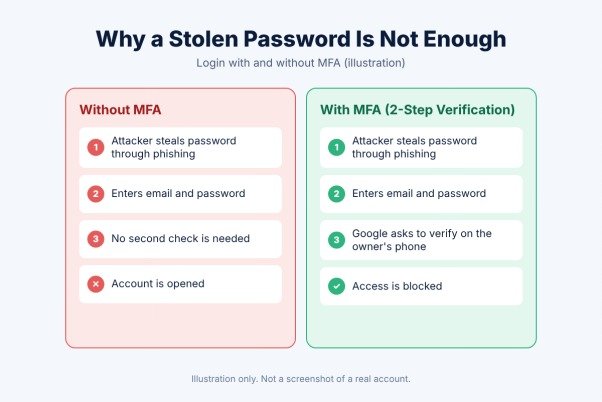
The main benefit was clear: signing in required more than just my password. This adds another layer of protection if someone discovers or steals a password. However, the exact verification process can vary depending on the account, device, and security settings.
My test had one important limitation: I tried this feature on only one account and one service. It does not prove that every multifactor authentication method works the same way or prevents every type of attack. Still, based on this limited experience, enabling two-step verification is a practical security step, particularly for important accounts such as email.
If you use online accounts for studying, freelancing, or business, consider enabling multifactor authentication wherever it is available. It cannot eliminate every risk, but it can make unauthorized access more difficult.
How Is AI Changing Cybersecurity?
Artificial intelligence (AI) is changing cybersecurity by helping security teams identify suspicious activity, analyze large amounts of data, and respond to potential threats more quickly. Some security tools use AI to recognize unusual login patterns, detect potentially harmful files, and flag behavior that may indicate an attack.
For example, if an account suddenly shows an unusual login pattern, an AI-powered security system may flag the activity for further investigation. This can help security teams identify possible problems, although an unusual login does not always mean an account has been compromised.
However, AI is not a complete solution to cybersecurity threats. These systems can make mistakes, miss suspicious activity, or produce false alerts. Attackers can also use AI to create more convincing phishing messages and support other deceptive activities.
For beginners, the most important lesson is that AI works best as part of a broader security approach. Keeping software updated, using strong and unique passwords, enabling multifactor authentication, and checking unexpected messages remain important habits. AI can support these measures, but it cannot replace careful decisions and responsible security practices.
Cybersecurity Best Practices for Beginners
You do not need advanced technical knowledge to start improving your online security. A few consistent habits can help protect your devices, accounts, and personal information.
1. Keep Your Software Updated
Install updates for your operating system, browser, and applications when they become available. Updates often fix known security weaknesses that attackers may exploit. Where possible, enable automatic updates.
2. Use Strong, Unique Passwords
Avoid using the same password across multiple accounts. If one website experiences a data breach, reused passwords can put your other accounts at risk. Consider using a reputable password manager to create and store strong passwords.
3. Enable Multifactor Authentication
Turn on multifactor authentication (MFA) for important accounts, especially email, banking, and cloud storage. It adds another verification step beyond your password, making unauthorized access more difficult.
For additional guidance, you can explore the NIST Cybersecurity Basics resource.
4. Be Careful With Unexpected Messages
Check the sender before clicking links, downloading attachments, or sharing personal information. Be cautious of messages that create urgency or ask you to verify an account unexpectedly. When in doubt, visit the organization’s official website directly.
5. Review Account Access and Sharing Settings
Check who can access your accounts, files, and folders. Remove permissions that are no longer needed, and avoid making private files publicly accessible through sharing links. Review these settings regularly, especially when working with sensitive information.
6. Protect and Test Your Backups
Keep backup copies of important documents, photos, and work files. Where possible, maintain a backup separate from your main device or network. Occasionally test whether you can restore your files so you know your backup works when you need it.
7. Secure Your Devices and Wi-Fi
Use a screen lock on your phone and computer, keep built-in security features enabled, and protect your home Wi-Fi with a strong password. Avoid downloading software from unfamiliar websites, and be cautious when connecting to public Wi-Fi networks.
These steps cannot prevent every cyberattack, but they can reduce common security risks. Start with your most important accounts and build safer habits over time.
Frequently Asked Questions About Cybersecurity
1. What Is Cybersecurity in Simple Words?
Cybersecurity means protecting devices, online accounts, networks, and digital information from unauthorized access, theft, and other online threats. It includes security tools as well as everyday habits, such as using strong passwords and avoiding suspicious links.
2. Why Is Cybersecurity Important?
Cybersecurity helps protect personal information, financial details, work files, and online accounts. Good security practices can reduce the risk of data theft, account takeovers, and malware infections for individuals, students, and businesses.
3. Can AI Prevent All Cyberattacks?
No. AI can help detect suspicious activity and identify potential threats, but it can make mistakes and may not detect every attack. Human judgment, regular software updates, strong authentication, and other security measures remain important.
4. Is Cybersecurity Only Important for Large Companies?
No. Individuals, students, freelancers, and small businesses also use online accounts and store personal or professional information. Anyone who uses internet-connected devices can benefit from basic cybersecurity practices.
5. What Are the First Steps Beginners Should Take?
Start by using unique passwords, enabling multifactor authentication on important accounts, keeping your devices updated, and checking unexpected messages before clicking links. Backing up important files and reviewing account-sharing settings can also help improve your security.
Final Thoughts
Learning cybersecurity does not have to begin with complicated tools or advanced technical skills. Understanding common threats, recognizing suspicious messages, and protecting your online accounts are practical first steps anyone can take.
While researching this article, I also learned the value of testing security features rather than relying only on explanations. My experience enabling Google 2-Step Verification showed me how an additional verification step can strengthen account protection, although one test cannot represent every service or security situation.
Cybersecurity is an ongoing responsibility, not a one-time task. Regular updates, unique passwords, multifactor authentication, and reliable backups can help reduce everyday risks. No single measure guarantees complete protection, but consistent habits can make your digital life safer.
Whether you are a student, freelancer, or business owner, start with the accounts and information that matter most to you. Small, sensible improvements can build a stronger foundation for online security over time.