
If you search for a project management tool for one person, you will find a long list of software that looks the same on the surface. Most promise task lists, calendars, and timelines, and most hide the limits until you sign up. I wanted to see what happens when a beginner with a personal Gmail address actually tries one, so I signed up for ProProfs Project and built a small project called “Website Launch.”
This guide covers what I did, what worked, what did not, what ProProfs says it offers, and who I think it suits. I keep my own results separate from the claims on the company’s website, because they are not the same thing.
How I Tested
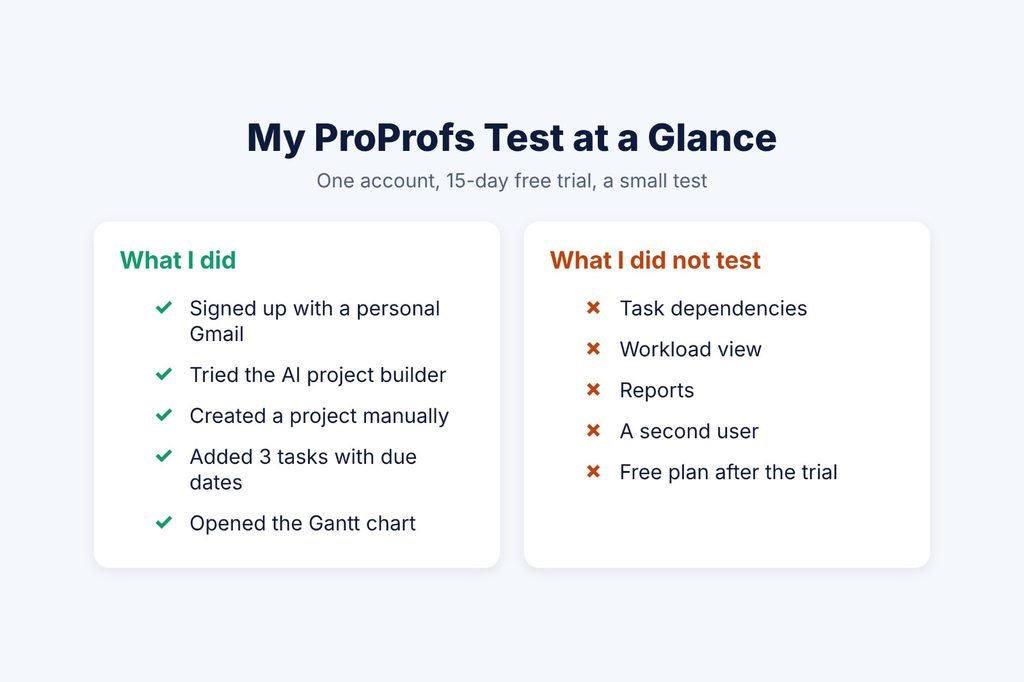
My test was small. I created a ProProfs Project account with my personal Gmail address and tested the software during the trial period. I tried the AI project builder, created a project manually, added three tasks with dates, opened the Gantt chart, and read the pricing page. I did not link tasks with dependencies, test workload views, open a report, or add a second user.
Whenever I describe a feature I did not use, I say it comes from ProProfs’s own pricing page. Prices and limits change, so check the official page before you pay.
Signing Up: Gmail Worked
I clicked “Get Started Free” on the homepage, used my personal Gmail address, and landed in a dashboard with an empty project list and the message “Create Your First Project.”
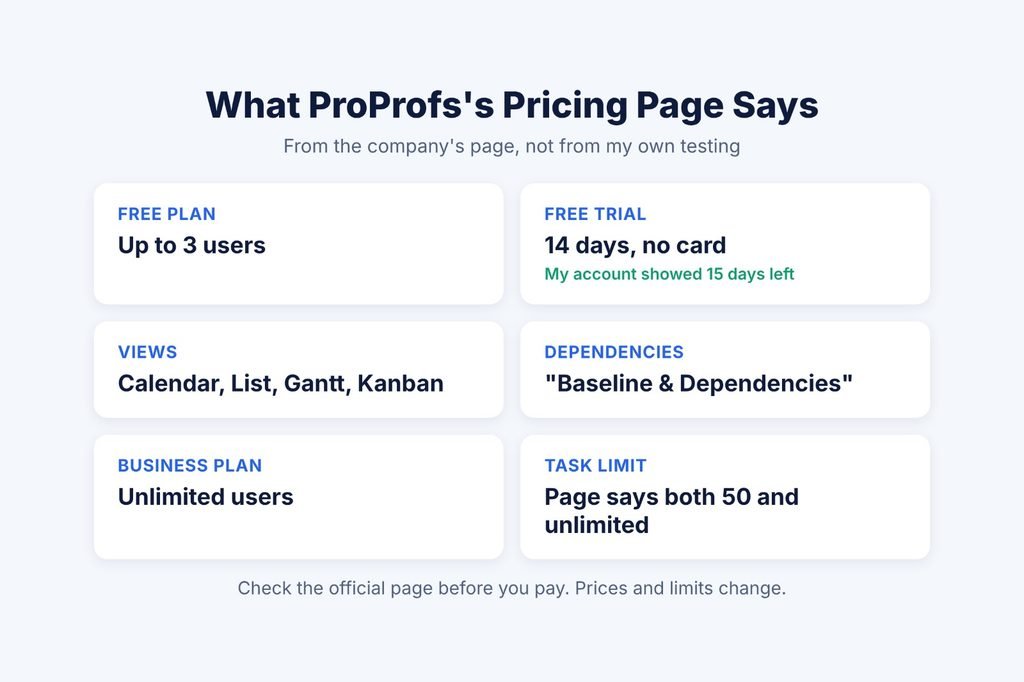
Two things stood out. A small banner at the bottom said “15 days left of your free trial,” and an orange “Upgrade” button sat in the top bar the whole time. The pricing page also advertises a forever-free plan for up to three users, so I cannot say what happens when my trial ends. I did not test that. The pricing page currently says the trial lasts 14 days with no credit card, while my banner said 15. I never entered a card.
A Contrast: A Tool That Refused My Gmail
Before ProProfs, I tried to start a trial of Celoxis. The signup form asked for a work email, and when I entered my personal Gmail it replied: “please use your work email so we can set up your trial.” I stopped there, so I cannot say anything about the tool itself. But if you are a freelancer with no company email, check whether a tool’s signup accepts personal addresses before you spend time on it.
Trying the AI Project Builder
ProProfs has an AI project builder, and it was the first thing I tried. The page says “Describe your project and let AI build the structure, tasks, and timeline for you.”
I typed “Website launch,” and the Generate Project button stayed light and would not respond. Clicking the suggested chip “Marketing Campaign Project” filled the box with a ready-made prompt, and then the button became active. So if the button looks dead, pick a suggestion first.
The Generate button only became active after I clicked a suggested prompt.
After I clicked Generate, a four-step setup wizard appeared:
- What type of project is this? I chose Standard Project over Scrum.
- Is this a billable project? I chose no.
- Do you want to track time for this project? I chose to skip it.
- Who will be working on this project? Only my own name was listed.
Step 1 of 4: Standard Project or Scrum Project.
Then a window said “ProProfs AI is generating your project” and showed four stages: Analyzing Project Input, Building Workflow & Stages, Creating Modules & Structure, and Finalizing Setup.
The last stage, “Finalizing Setup,” on my second try.
Here it went wrong for me. On my second try, I watched all four stages tick off and the window closed. Then I was back on the fourth step of the wizard with the Generate Project button active again, as if nothing had happened. My first try had ended on the same screen. I opened the Projects menu and searched for “Website launch,” and it said “No project found.” A projects file I downloaded from the app was also empty. I cannot say why. It could be a temporary problem, a trial limit, or something I did wrong, so do not treat this as proof the AI builder is broken. It only tells you what happened to me, on one account.
Searching the Projects menu after the AI builder finished.
Creating a Project Manually
Since the AI builder gave me no project, I used “Create from Scratch” on the templates page. A side panel opened with a project name, an assignee (already set to my account), a project type (Normal Project or Scrum Project), a due date set to “Ongoing,” tags, and a progress percentage. My first attempt did not leave me with a project I could find, so I started again from the same button, typed “Website Launch” again, and this time the project was created.
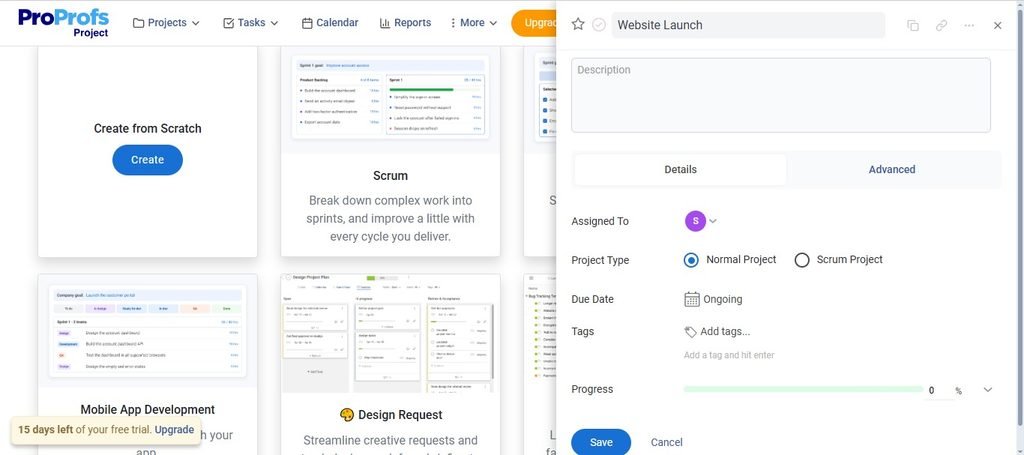
The “Create from Scratch” panel. Nothing in it was confusing.
I added three tasks: Write content, Design page, and publish. At the top of the project there are four views: List, Calendar, Gantt Chart, and Kanban.
My three tasks in List view. The Due column showed “Ongoing” until I set dates.
Setting Dates
Every task started with “Ongoing” in the Due column. When I clicked it, a calendar opened, and the date I chose became the due date. The start date was a separate step: below the calendar there are two small options, “Set Time” and “Add Start Date.” The List view then showed only one date per task, so I could not see the full range there. I set due dates of November 9 for Write content, November 12 for Design page, and November 15 for publish.
The calendar picker. “Add Start Date” is a separate option at the bottom.
The Gantt Chart
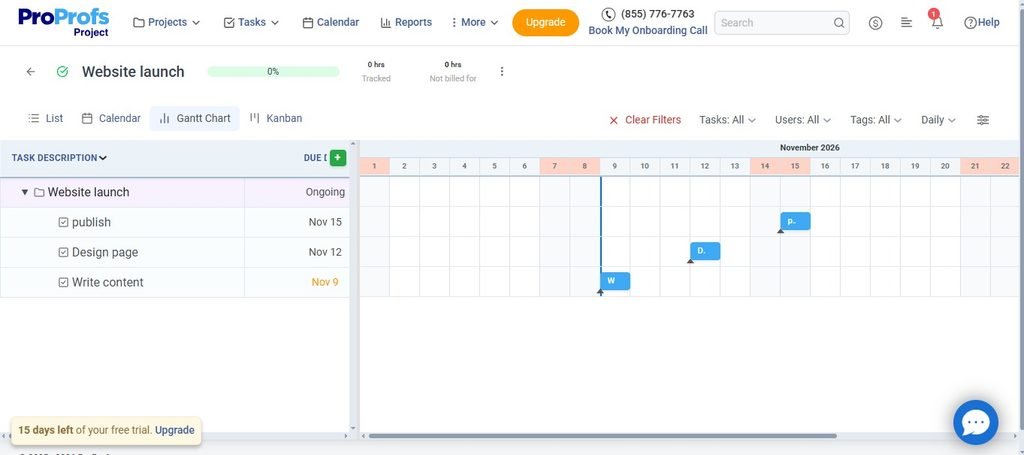
I clicked the Gantt Chart tab, and it opened without any lock or upgrade message on my trial account. It showed the three tasks as blue bars on a November 2026 timeline, with a blue line marking today. Because I had only set due dates, each bar was a single day wide. There is also a “Daily” zoom dropdown and filters for tasks, users, and tags.
The Gantt chart with my three tasks, each shown as a one-day bar.
I stopped here. I did not link the tasks to each other, so I cannot say how ProProfs handles changes in dates.
Key Features of Project Management Software, According to ProProfs
This section is from ProProfs’s pricing page, not from my testing. The page lists four views (Calendar, List, Gantt, and Kanban), “Baseline & Dependencies,” unlimited projects, AI reports and analytics, time tracking with timesheets and invoices, discussions, due dates and reminders, custom fields and workflows, and roles and permissions. Of these, I only saw the List, Gantt, and Calendar views, and the time tracking and billing questions in the wizard.
When comparing project manager software tools, the features that usually matter most are a timeline view, task dependencies, a way to see workload, and reports. If dependencies matter to you, test them during the trial: link two tasks, move the first one’s date, and see whether the second one shifts.
Is It a Good Personal Project Management Application?
From what I saw, ProProfs works for a single user without fuss. The wizard listed only my name, the project was assigned to me by default, and nothing forced me to invite anyone.
The pricing page has one contradiction. The free plan lists “Up to 50 Open Tasks & Sub-Tasks,” but the FAQ on the same page says you can create unlimited tasks and subtasks on any plan. I only created three tasks, so I never reached a limit. Confirm this with ProProfs if you plan a bigger workload.
Is it the best project management tool for one person? I cannot claim that from one short test. I can say that signup worked with a personal email, the Gantt view was open on my trial, and the free plan appears aimed at small users.
Does It Work as a Project Management Tool for Teams?
I did not test teamwork, so this comes from the pricing page only. The free plan covers up to three users. For larger teams, ProProfs lists a Business plan with unlimited users. Its current pricing page shows a price of $39.97 per month when billed annually, or $479.64 for the year. I did not test the Business plan, so I cannot comment on its team features or overall value.
If you are considering a paid plan, check the official ProProfs Project pricing page for the latest price and plan details before signing up.
What About Desktop Software?
If you search for desktop project management software, note that I used ProProfs entirely in my Chrome browser. I did not look for a downloadable desktop app, so I cannot say whether one exists.
Who Is ProProfs Project Good For?
Based on my small test, it may suit freelancers and solo workers who want a free account that accepts a personal email, small teams of up to three, and service businesses that want billing and time tracking in the same tool. It may be a weaker fit if you need an AI builder that works first time, or if you must be sure about dependencies and workload views before you commit. I could not confirm either.
Limitations of My Test
I used one account, a few hours, and the trial period. I did not link dependencies, check workload, look at reports, invite a second user, or test the free plan after the trial. The AI builder problem may be temporary. Please treat this as a first look, not a full review.
Frequently Asked Questions
Does ProProfs Project accept a personal Gmail address?
Yes, for me it did, and I received a 15-day free trial. Celoxis, another tool I tried, asked for a work email and rejected mine.
Is ProProfs Project free?
Yes. ProProfs currently lists a free plan for up to three users. However, its pricing page mentions up to 50 open tasks and subtasks in the feature list, while its FAQ says tasks and subtasks are unlimited on every plan. I did not test the free plan after my trial or create enough tasks to verify this limit, so check with ProProfs if it matters to your work.
How long is the ProProfs Project free trial?
The official pricing page currently advertises a 14-day free trial with no credit card required. My own dashboard showed a banner saying “15 days left.” I am sharing both details because that is what I saw during my signup and what the pricing page currently states.
Did the AI project builder work?
Not for me. I tried it twice. The second time, all four progress stages finished, but I was sent back to the setup screen and no project appeared. I made one manually instead.
Does ProProfs have task dependencies?
The pricing page says it includes “Baseline & Dependencies.” I did not test this myself.
Final Thoughts
ProProfs Project made a good first impression on signup: a personal Gmail worked, no card was needed, the manual project took little setup, and the Gantt chart opened on the trial. The AI builder gave me no project, and I did not reach the deeper features, so I cannot tell you whether it handles dependencies or workload well. If you are comparing project manager software tools, treat ProProfs as worth a short trial. Link two tasks, move a date, and see for yourself whether it does what its pricing page says.